Best Wireless In-Ear Monitors for Musicians
The best wireless in-ear monitor systems for live performance, from budget to pro. Tested on stage by working musicians.
Music Gear Specialist Review Desk
Gear Research & Analysis
ℹ️ Affiliate Disclosure: Music Gear Specialist earns from qualifying purchases through Amazon and other partner links. This doesn't affect our recommendations—we only suggest gear we'd use ourselves.
Floor wedge monitors are slowly dying. Every professional tour, festival stage, and serious club gig has shifted to in-ear monitoring systems, and the technology has gotten affordable enough that even bar-band musicians can make the switch without draining their savings.
The benefits go beyond sound quality. In-ear monitors protect your hearing from the cumulative damage of standing next to a cranked floor wedge for four hours every weekend. They eliminate stage volume wars where every musician keeps turning up their wedge until the stage sound is louder than the PA system. And they give you a consistent reference mix that does not change when you walk to a different part of the stage.
This is a research-desk buying page, not a touring diary. The systems below are the ones working-musician listings and manufacturer RF specs keep putting in the same cart: a UHF or 2.4 GHz transmitter, a matching bodypack, and earpieces you can actually seal. Music Gear Specialist Review Desk did not drop a PSM300 off a drum riser to write this.
How Wireless IEM Systems Work
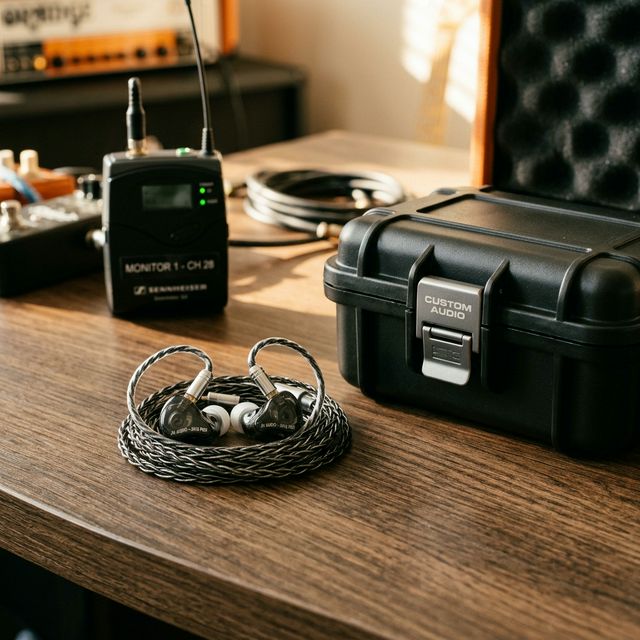
A wireless in-ear monitor system has three components:
Transmitter: A rack-mounted or half-rack unit that sits at your mixing console or side-stage. It receives the monitor mix from the mixing board and broadcasts it via RF (radio frequency) signal to the bodypack receivers.
Bodypack receiver: A belt-clip unit about the size of a deck of cards that receives the RF signal and outputs it through a standard 3.5mm headphone jack. It includes a volume control and often a limiter to protect your hearing from sudden signal spikes.
Earpieces: The actual in-ear monitors that fit in your ears. Most systems ship with basic earpieces, but upgrading to quality IEMs is one of the most impactful improvements you can make.
The RF transmission is critical because it determines range, reliability, and audio quality. Professional systems use UHF frequencies with advanced diversity reception (two antennas that automatically select the stronger signal) to prevent dropouts as you move around the stage.
The 5 Best Wireless In-Ear Monitor Systems
1. Shure PSM300 - Best Overall Value
The PSM300 has been the industry standard for working musicians for over a decade, and the latest revision maintains that reputation. The MixMode feature lets you create a personal stereo mix from two mono sends, which means you can balance your vocal against the band mix on the fly using the bodypack controls.
RF performance is reliable up to 90 meters line-of-sight, which covers any stage scenario including large outdoor festivals. The audio quality is clean with a frequency response of 38Hz-15kHz, which is narrower than high-end systems but more than adequate for live monitoring.
Shure lists a metal bodypack on the PSM300. That is the listing-check difference versus plastic budget packs, not a drop-test this desk ran.
2. Sennheiser EW IEM G4 - Best Audio Quality
The Sennheiser EW IEM G4 delivers noticeably wider frequency response (50Hz-16kHz) and cleaner high-frequency reproduction than the Shure PSM300. If audio fidelity is your top priority, and you are pairing the system with high-quality custom or universal IEM earpieces, the Sennheiser lets those earpieces shine.
The system supports up to 16 compatible channels, making it ideal for large bands or venues running multiple monitor mixes. The bodypack includes a focus/EQ mode that lets you shape the frequency response from the receiver, which is handy when different earpieces need different EQ compensation.
At $750-$850, it costs more than the PSM300 but rewards the investment with superior audio quality for vocalists and acoustic instrumentalists who rely on hearing subtle tonal details in their monitor mix.
Sennheiser EW IEM G4 on Amazon
3. Xvive U4 - Best Budget Wireless System
The Xvive U4 disrupts the budget IEM category with a $200 system that uses 2.4GHz digital transmission instead of traditional UHF frequencies. The digital signal path eliminates the companding artifacts (pumping and breathing sounds) that plague cheap analog UHF systems.
The trade-off is range: 2.4GHz limits you to about 30 meters in ideal conditions, and interference from Wi-Fi routers and other 2.4GHz devices can cause dropouts in electronically dense environments. For small to medium venues (up to about 300 capacity), the Xvive U4 performs reliably and sounds remarkably clean for its price.
The system includes a transmitter and one bodypack receiver. Additional receivers can be added for $100 each, which makes outfitting an entire band relatively affordable.
4. Galaxy Audio AS-1400 - Best Budget UHF Option
If you want traditional UHF reliability at a budget price, the Galaxy Audio AS-1400 delivers at around $270 per system. The analog UHF transmission provides about 60 meters of range with better penetration through walls and obstacles than 2.4GHz digital systems.
The audio quality is acceptable but noticeably compressed compared to the Shure and Sennheiser options. The companding process (compressing the signal for transmission and expanding it on reception) introduces subtle artifacts that are audible on high-quality earpieces. Through basic earpieces, the difference is minimal.
Build quality is listed as adequate for light-to-moderate gigging. The plastic bodypack is the twin to watch versus Shure’s metal pack — player reports treat it as weekend-gig hardware, not a touring tank.
Galaxy Audio AS-1400 on Amazon
5. Shure PSM900 - Best Professional System
The PSM900 is what major touring acts and A-list sound engineers specify. The audio quality is full-bandwidth (40Hz-16kHz with exceptional clarity across the spectrum), the RF performance is bulletproof even in dense RF environments like festival sites with dozens of wireless systems operating simultaneously, and the CueMode feature lets the engineer send talkback to individual performers without interrupting the show mix.
At $2,500+ per system, the PSM900 is priced for professional touring budgets. Unless you are playing venues with significant RF congestion or your livelihood depends on zero-dropout performance, the PSM300 provides 90% of the capability at a fraction of the cost.
Choosing Your Earpieces
The earpieces matter as much as the wireless system. Shipping earpieces from transmitter manufacturers are typically low-quality single-driver universals that sound thin and harsh. Upgrading your earpieces transforms the entire monitoring experience.
Budget universals ($30-$80): The KZ ZS10 Pro ($40) and Shure SE215 ($80) are popular choices. Multiple balanced armature or hybrid drivers deliver clearer frequency separation than single-driver earpieces.
Mid-range universals ($100-$300): The Shure SE425 and Westone UM Pro 20 add a dedicated low-frequency driver for better bass response and wider soundstage. These are the sweet spot for most gigging musicians.
Custom-molded IEMs ($400-$1,500+): An audiologist takes impressions of your ear canals, and the earpieces are built to fit your ears exactly. The perfect seal delivers unmatched noise isolation (up to 26dB), the most accurate bass response, and all-day comfort that universal-fit tips cannot match.
Making the Switch from Wedges
Transitioning from floor wedges to in-ears takes adjustment. The first few gigs will feel strange because you lose the physical vibration of a loud wedge hitting your body, the ambient room sound disappears, and the perceived loudness is different.
Tips for a smooth transition:
- Run one earpiece in and one out for the first few gigs. This maintains some ambient awareness while you adjust.
- Add a small amount of ambient microphone feed to your IEM mix. A single condenser mic aimed at the audience picks up crowd noise, room ambience, and the natural sound of the stage.
- Keep your IEM volume lower than you think you need. Your ears are extremely close to the drivers, so moderate volume delivers plenty of detail without the hearing damage risk.
- Communicate with your sound engineer. IEM mixes are more detailed than wedge mixes because you hear every element with clarity. Spend time at soundcheck dialing in the perfect blend for your instrument and role.
The home studio recording essentials guide covers similar monitoring concepts for the studio side if you want to understand how monitoring translates between live and recording environments.
Hearing Protection: The Hidden Benefit
The Occupational Safety and Health Administration (OSHA) sets the safe exposure limit at 85dB for 8 hours. A typical rock band stage volume from floor wedges averages 100-110dB, which is safe for only 15 minutes to 2 minutes, respectively. Playing a 3-hour gig at those levels causes measurable hearing damage that accumulates over years.
In-ear monitors with proper isolation let you monitor at 75-85dB with perfect clarity, staying within safe exposure limits for the entire performance. This is the single most compelling reason to switch, and it is the one most musicians do not think about until they already have tinnitus.
Protect your ears. They are the only ones you get, and no amount of gear upgrades can fix hearing loss from years of standing in front of a cranked guitar amp.
Band, latency, and bodypack twins
The listing title will say “wireless IEM.” The checkout is three different products:
- Transmitter band. UHF (PSM300, EW IEM G4, AS-1400) vs 2.4 GHz digital (Xvive U4). UHF needs a legal frequency set for your country. 2.4 GHz shares the room with Wi-Fi.
- Latency. Analog FM and purpose-built digital RF stay under a few milliseconds. Consumer Bluetooth earbuds sit at 150–300 ms and are not a bodypack substitute.
- Bodypack twin. PSM300 pack vs PSM900 pack vs Xvive vs Galaxy plastic. Metal vs plastic, MixMode vs stereo-only, and whether a second pack can share one transmitter.
A full IEM rack — antenna distribution, PSM900-class transmitters, custom molds — is a touring cart. Bedroom practice does not need it.
Buying notes (what to check before you click)
Listing checks Amazon copy skips. PSM / G4 / Xvive street prices on this page are a research snapshot, not a live offer.
Use-case fit
- Club / festival UHF, MixMode: Shure PSM300. Confirm the band (G10 / H20 / J13 class) matches your country.
- More channels, wider response: Sennheiser EW IEM G4.
- Bedroom or 200-cap, 2.4 GHz: Xvive U4 — not a full rack.
- Pedalboard into that mix: best overdrive pedal for blues. Desk gain for speech: Cloudlifter + Scarlett + SM7B.
When to skip / when to buy
- Skip a full IEM rack for bedroom practice. Antenna distro, PSM900, and custom molds are a touring cart.
- Skip consumer Bluetooth earbuds as “wireless IEMs.” 150–300 ms latency is not a bodypack.
- Skip a 2.4 GHz pack for a festival pit next to Wi-Fi and other in-ears on the same band.
- Buy PSM300 (or G4) for UHF stage work. Buy U4 if the room is small and you accept 2.4 GHz limits.
Listing checks the product title usually omits
- transmitter/receiver band / latency / bodypack twins. UHF vs 2.4 GHz, analog FM vs digital RF, PSM300 pack vs PSM900 pack vs Xvive. Same “wireless IEM” thumbnail.
- Band / frequency set. A US H8 band pack is not a EU band pack.
- Stereo vs MixMode vs mono. Two sends vs one.
- Included earpieces vs SE215-class upgrades. Stock sleeves are not custom molds.
- Legal band after 600 MHz wireless changes. Old stock can be unsellable in your country.
Next reads: pedals hub · best music gear roundups.
Related Reading

Music Gear Specialist Review Desk
Research-based reviewsResearch-based reviews · Manufacturer specs · Verified owner feedback
We review guitars, amps, pedals, and recording gear the honest way: spec sheets, published measurements, and the collected experience of working musicians and verified owners.